GANTT360
The modern think-cell alternative

The Gantt chart your SteerCo actually wants to see

Build exec-ready Gantt charts in the browser. Ship them to PowerPoint in one click. AI that reads your project plan — and drafts the update for you.

Paste your plan straight from Excel, Jira, or a spreadsheet — no retyping.

Free forever on the Free plan · No credit card · Cancel anytime

2 min
not 45 in PowerPoint
¼
of think-cell's price
0
plugins to install
100%
in the browser
EU-hosted — your data stays in EuropeBuilt in Vienna by a 25-year program managerFree forever · no credit cardYour charts & data never train AI models
How it works

From spreadsheet to SteerCo in 2 minutes

Three steps. No plugin, no rebuild, no PowerPoint fiddling.

01

Paste your plan

Copy your task list from Excel, Jira, or any spreadsheet — tasks, dates and owners become bars instantly. Or start from a template.

02

Drag & drill

Move a bar and every dependency reflows automatically. Collapse phases for execs, expand them for the delivery team — one chart, both audiences.

03

Ship it

Export to editable PowerPoint shapes — not a screenshot — a live share link, or PNG. Two minutes, start to finish.

GANTT360° building a steering-committee chart from a pasted plan
Click to enlarge
One chart · two audiences

Drillable phases, editable PowerPoint

Executives see collapsed phases. Delivery teams drill into task-level detail. Same chart, both views — exported as real grouped PowerPoint shapes, not a screenshot.

DrillableEditable .pptxAuto-reflow
Progress42%Duration16wGo-Live23dResources6At Risk2ActivityOwnerJun 2026Jul 2026Aug 2026Sep 2026TODAY▼ PreparationRuan Data MigrationM. Chen Legacy ExportA. Kumar▼ ExecutionRobert UAT Cycle 1S. Park CutoverR. Aksan▶ HypercareTeam Post Go-LiveL. TorresGo-Live · 15 AugGate Review
Click to enlarge
Everything the update needs

One tab. Zero rework.

A senior PM on call, 24/7

Paste a stakeholder email, drop a screenshot, ask “what if UAT slips?” — the AI Coach reads your chart, flags risks, and drafts your next move.

PM AdvisorWhat-IfRisk Register

Share a link, not a deck

Send an interactive, drill-enabled share link. Embed it in Confluence or Notion. Mobile-responsive, no login required.

Share linksEmbed

Versioned & measured

Every edit auto-saved with full history — compare any two versions, restore in one click. A live KPI dashboard reads the plan for you.

Version historyKPI dashboard
Swimlane view
Group by phase or owner
Baseline vs. actual
Plan drift at a glance
Critical path
The chain that moves end dates
Since-last-version
Ghost bars + NEW pill
Built for program managers

The answers execs actually ask

Who owns what? What slipped since last month? Which tasks are on the critical path? Toggle swimlanes, show baseline ghosts, highlight the longest chain — all one click. No spreadsheet.

Why it exists

Every PM has lost a Sunday night rebuilding a chart in PowerPoint the week of a SteerCo.

GANTT360° exists so you never have to again. Paste your plan. Drag the dates. Ship it. Two minutes — and it looks like it took an hour.

Start Free — No Credit Card
Built for

Who ships presentation-grade charts

Simple, transparent pricing

About a quarter of think-cell’s per-seat price. Cancel anytime.

Free plan forever — no credit card required.

Free
€0
  • 3 charts
  • PNG export
  • 10 versions/chart
  • KPI dashboard
  • AI chart creation
Get started
Most Popular
Pro
€12/month
  • Unlimited charts + folders
  • All exports (.pptx, .pdf, .png)
  • 3 share links + embed
  • All AI + reports + risk register
  • 8 slide themes
Start Free
Business
€24/month
  • Everything in Pro
  • Unlimited share links
  • Password-protected links
  • Drill-Down Deck export
  • Priority support
Get Business

Prices billed in EUR (€). Non-EUR cards are converted automatically by your bank at the prevailing rate.

FAQ

Questions, answered

What is GANTT360°?
GANTT360° is a presentation-grade Gantt chart studio that runs entirely in the browser. It builds the kind of Gantt charts you show to executives in steering committees — same quality as think-cell, at one-quarter the price, with no PowerPoint plugin required.
How is GANTT360° different from Jira, Asana, or Monday?
GANTT360° is not a project management tool. It has no task assignments, workflows, or notifications. It's a chart-building tool — for the moment you need to present project status to leadership. Use it alongside your existing PM tool to build the executive-facing chart in 2 minutes instead of 45.
Does GANTT360° export to PowerPoint?
Yes. Charts export as real PowerPoint shapes — not images. The recipient can edit text, resize bars, and recolor elements directly in PowerPoint after download. This matches how think-cell exports work.
Is there a free version?
Yes. The Free plan is genuinely free forever — no credit card required, no trial period. You get 3 charts, PNG export, and the KPI dashboard. Upgrade to Pro (€12/month) when you need PowerPoint export, sharing, or AI features.
What AI features does GANTT360° include?
GANTT360° includes Claude-powered features: AI SteerCo summary (generates an executive narrative from live chart data), what-if scenario planning, automatic risk detection, AI advisor chat, and weekly status reports.
Can I share a chart with people who don't have an account?
Yes. Pro plan includes shareable links — public, read-only URLs that are mobile-responsive and drill-interactive. Recipients can view and drill into the chart in any browser; no login required.
How much does GANTT360° cost?
Free plan is €0/month. Pro is €12/month (annual billing: €119/year = €9.92/mo) — about a quarter of think-cell's per-seat price. Business is €24/month (€229/year) and adds the Drill-Down Deck export, password-protected links, unlimited share links, and priority support. All plans billed in EUR. Cancel anytime. No long-term contracts.
Can I import my existing plan?
Yes. Paste your task list straight from Excel, Jira, or any spreadsheet — copy the rows (task, start date, end date, owner) and paste them in. GANTT360° turns them into a formatted chart instantly, so you don't retype anything. You can also start from a template or build from scratch.

Stop wasting 45 minutes in PowerPoint

Your next Steering Committee chart takes 2 minutes. Beautiful, interactive, AI-analyzed, shareable.

Start Free — No Credit Card

No credit card · Free plan forever

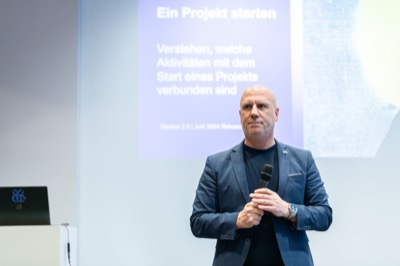
Robert Aksan presenting at PMI Austria
Built in Vienna

“25+ years managing IT projects and digital transformations for large international enterprises — SAP rollouts, cloud migrations, org-wide change programs. Every steering committee, I wasted 45 minutes rebuilding the same Gantt in PowerPoint. GANTT360° is the tool I wished existed.”

Robert Aksan
Founder · BOTFORCE GmbH, Vienna